How VaultStage works
Every automation in VaultStage is a Flow, and every Flow has three stages: WHEN something happens → GUARDED BY your conditions → EXECUTE exactly what you staged. A flow runs only when its trigger fires and every guard passes. Everything happens on your device — no accounts, no servers.
Take the tour
The real app, screen by screen.
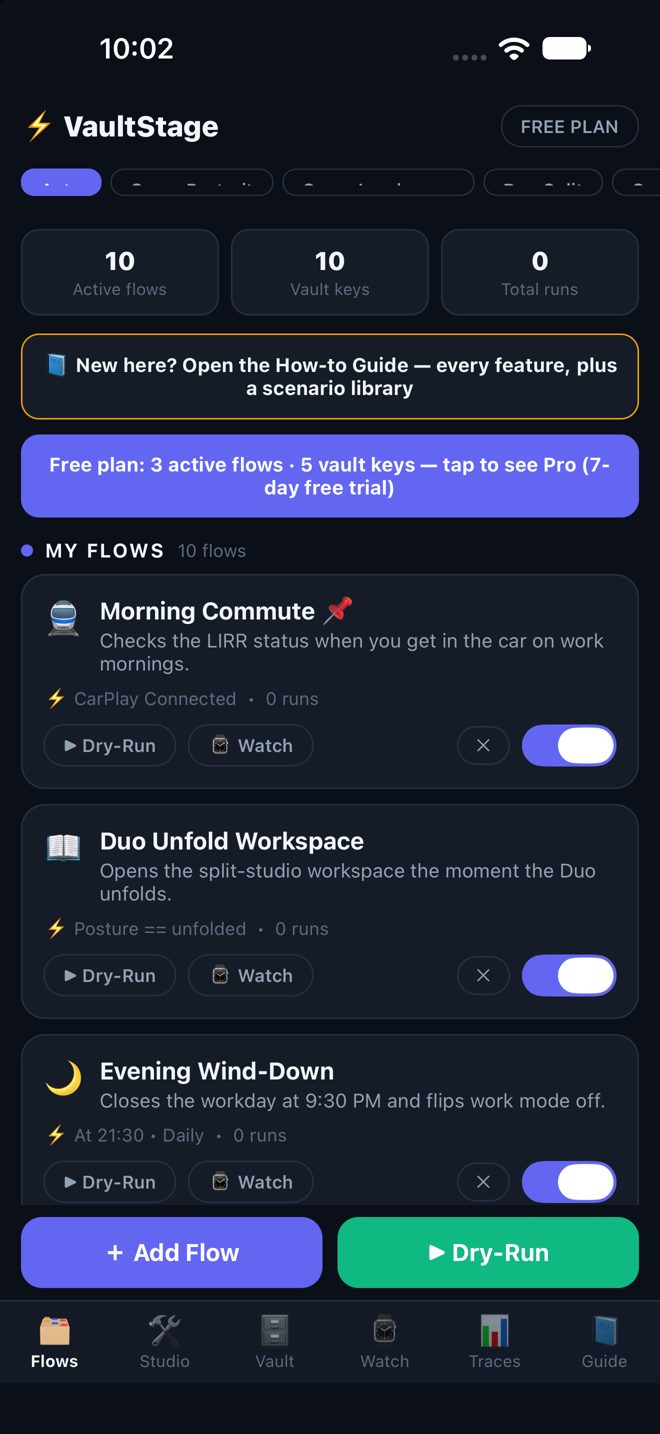
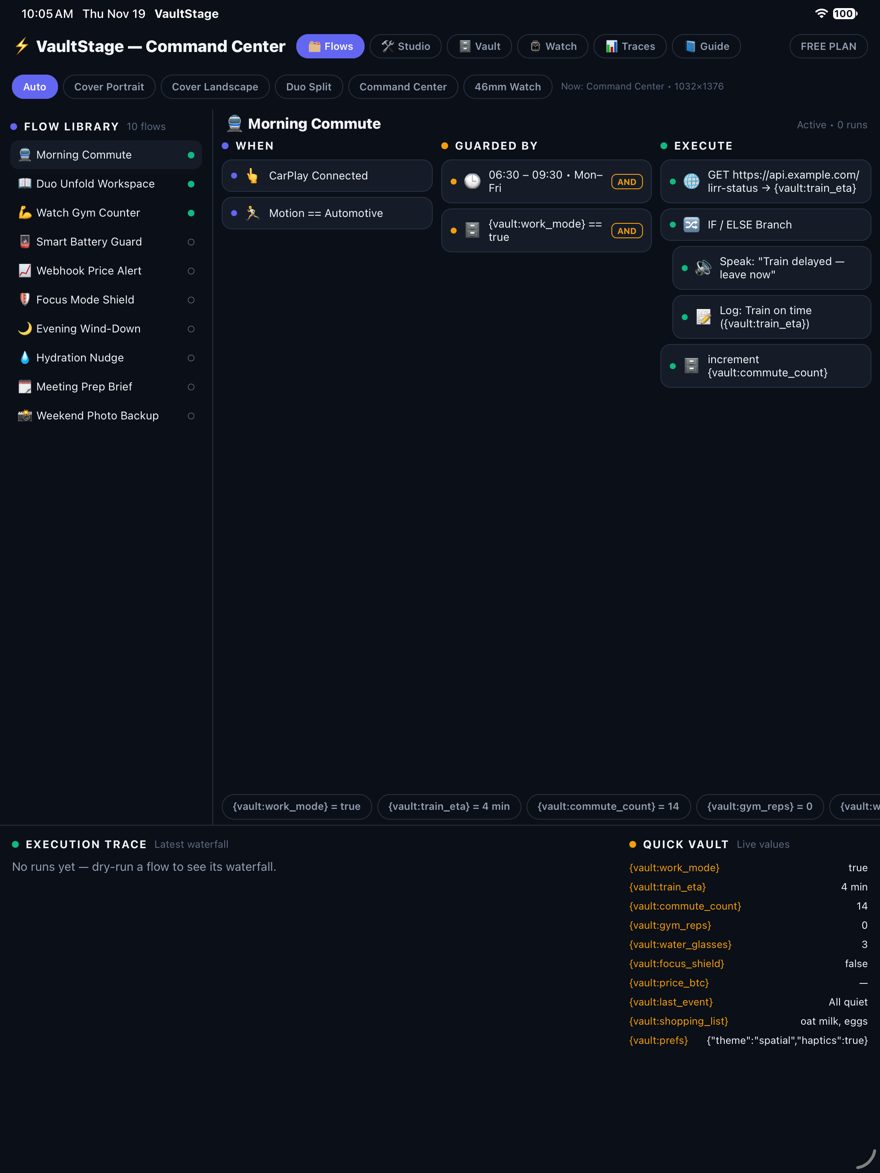
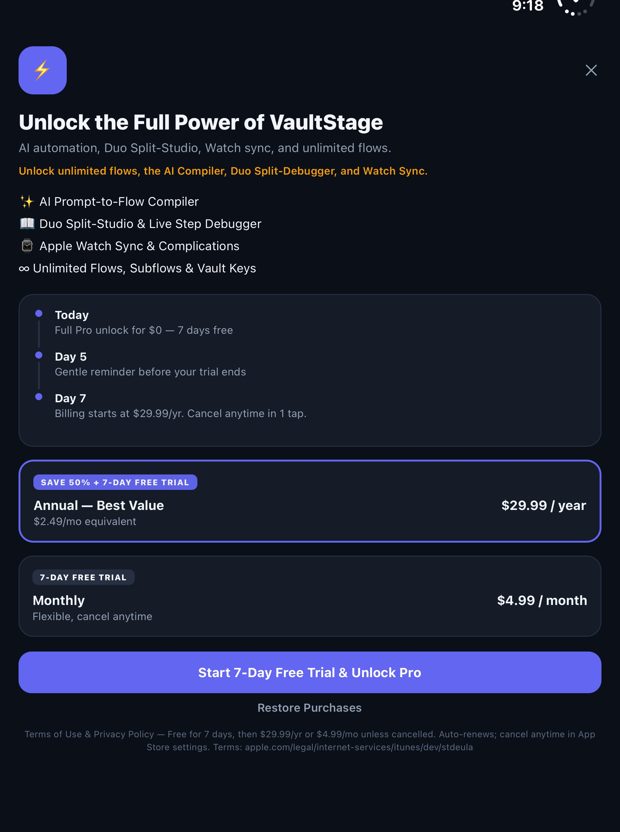
Start in two minutes
Fastest: install a Blueprint
Flows tab → Blueprints → tap + Add. The flow lands in My Flows ready to run. Open it to tune times, thresholds, and messages.
Or build your own
Tap + New Flow, name it, and open it in the Studio: add a WHEN trigger, optional GUARDED BY conditions, and EXECUTE actions — each stage has a + menu of every node type.
Test it safely
Tap ▶ Dry-Run on the flow card. The debugger rehearses the run and Traces shows every step’s verdict — nothing real fires during a dry-run.
Switch it on
Flip the flow’s toggle. It now runs by itself whenever its trigger and guards line up.
The pieces
🗄️ The State Vault — shared memory
Vault keys hold numbers, switches, and text (gym_count, work_mode, price_btc…). Guards read them (“only run if work_mode is true”), actions write them (+1, set, clear), and messages quote them live: {vault:price_btc} prints the current value. HTTP actions can pull a field out of a JSON response straight into a key. Free tier holds 5 keys; Pro is unlimited.
🛡️ Guards — where the smarts live
Mix time windows, Vault comparisons, battery level, charging state, Low Power Mode, device posture, landscape, watch connection, network state, and cooldowns. Groups combine with AND / OR / XOR / NOT logic and can nest inside groups. A cooldown is the polite one: “don’t run me again for 30 minutes.”
✨ Describe it instead — the Compiler (Pro)
In the Studio, tap ✨ Compiler and type what you want in plain words: “Remind me to drink water every hour and count each glass.” VaultStage drafts the flow locally on your device — no cloud AI, nothing leaves your phone. Review it, tweak it, save it.
⌚ Watch Studio & the Duo
Pin flows for one-tap wrist launching, flip Vault switches and steppers from the wrist, and preview 46mm complications. On a dual-screen device, unfold and the Studio splits: editor left, live debugger and Vault right. Landscape turns the Studio into a 3-column board.
Free vs Pro
Free: 3 active flows, 5 Vault keys, the full Blueprint library. Pro: unlimited flows and keys, the Compiler, Subflows & advanced guards, Watch Studio, and the Duo split debugger — 7-day free trial, then $4.99/mo or $29.99/yr.
If a flow didn’t run
1) Is it switched on? Paused flows never fire. 2) Check Traces — the waterfall shows exactly which guard said no. 3) Cooldown still warm? A flow inside its cooldown window waits. 4) Free-tier limit hit? A 4th active flow needs Pro. 5) Dry-run it — the debugger walks every step with you.
Scenario library
A recipe for every situation. Install the named Blueprint, or build it by hand with the path shown. Together these cover every trigger, guard, and action family in the app.
Everyday routines
💧 Hourly hydration, counted
WHEN Interval — every 1 hour
GUARDED BY Time window 9:00–17:00 · Cooldown 30 min
EXECUTE Notify “Drink a glass of water” · Vault water_count +1
Blueprint: Hydration Nudge
🌙 Evening wind-down
WHEN Time — 18:00
GUARDED BY Vault work_mode == true
EXECUTE Speak the day’s summary · Set work_mode = false · Notify
Blueprint: Evening Wind-Down
📸 Weekend photo backup
WHEN Time — Saturday 10:00
GUARDED BY Network is Wi-Fi
EXECUTE Run Shortcut “Backup Photos” · Notify “Backup started”
Blueprint: Weekend Photo Backup
👆 One-tap “notify me” button
WHEN Manual — run it yourself
EXECUTE Call Subflow “Notify Me” (phone + watch + haptic in one step)
Manual: + New Flow → WHEN Manual → EXECUTE Subflow
Device & battery
🪫 Low-battery warning that escalates
WHEN Battery drops below 20%
GUARDED BY Not charging
EXECUTE Notify “Battery low” · If battery < 10% → Watch alert (SOS)
Blueprints: Smart Battery Guard + Low Battery SOS
🔌 Charger plugged in log
WHEN Charger connects
EXECUTE Log the time · Speak “Charging”
Manual: WHEN Charger → EXECUTE Log + Speak
📐 Unfold the Duo, open your workspace
WHEN Posture changes to Unfolded
EXECUTE Notify “Workspace ready” · Open your work flow in the Studio
Blueprint: Duo Unfold Workspace
📶 Back on Wi-Fi? Sync up
WHEN Network changes to Wi-Fi connected
EXECUTE HTTP GET your sync URL · Save the result to a Vault key · Log it
Manual: WHEN Network → EXECUTE HTTP
Focus & work
🛡️ Focus Mode shield
WHEN Focus “Work” turns on
EXECUTE Set work_mode = true · Notify “Distractions muted until 5 PM”
Blueprint: Focus Mode Shield
🗓️ Meeting prep brief
WHEN Calendar event within 15 minutes
GUARDED BY Time window — weekday working hours
EXECUTE Notify “Meeting in 15m — your brief is ready”
Blueprint: Meeting Prep Brief
🚆 Morning commute check
WHEN Time — 7:30, Mon–Fri
EXECUTE Fetch train status (HTTP) · Save it to the Vault · Speak it
Blueprint: Morning Commute
⏳ Countdown watcher
WHEN Countdown on a Vault key reaches zero
EXECUTE Notify + haptic — timers stored in the Vault
Manual: WHEN Countdown → pick the Vault key
Health & watch
💪 Gym counter on your wrist
WHEN Watch — Workout Started
EXECUTE Vault gym_count +1 · Start a Live Activity · Watch alert
Blueprint: Watch Gym Counter
🚶 Step-goal celebration
WHEN Health — Steps reach 10,000
EXECUTE Notify “Goal hit” · Haptic success
Manual: WHEN Health → EXECUTE Notify + Haptic
🏃 Walk detector
WHEN Motion changes to Walking
EXECUTE Run your walking Shortcut or open a deep link
Manual: WHEN Motion → EXECUTE Shortcut
Places, travel & data
✈️ Travel day assistant
WHEN Arrive at the airport (Place / geofence)
EXECUTE Notify “Travel day” · Send the details to your watch
Blueprint: Travel Day Assistant
📈 Price alert from a webhook
WHEN Webhook posts a new price
GUARDED BY Vault price_btc is below your target
EXECUTE Notify “BTC: {vault:price_btc}” · Watch alert
Blueprint: Webhook Price Alert
🌐 Fetch & log anything
WHEN Any trigger you like
EXECUTE HTTP GET a URL · Pull a value out of the JSON into a Vault key · Log it
Subflow: Fetch & Log — reuse it inside any flow
Power patterns
🔀 Branch on a condition
EXECUTE If / Else action: one path when the guard passes, another when it doesn’t
Studio: EXECUTE → + → If / Else
🔁 Repeat a step
EXECUTE Repeat an action 3× with a Wait between — reminders that insist
Studio: EXECUTE → + → Repeat + Wait
🧩 Build once, reuse everywhere
EXECUTE Save a sequence as a Subflow and call it from any flow
Ships in the box: Notify Me · Fetch & Log · Morning Reset
🛑 Stop a flow mid-run
EXECUTE Halt action — nothing after it executes
Studio: EXECUTE → + → Halt